Proven bar-for-bar before release
Systematic MetaTrader 5 indicators — each one proven bar-for-bar before it ships.
Most MetaTrader 5 indicators are whatever happened to compile. StratusQuant builds each one as an original MT5 instrument and proves it value-by-value against its reference before it ever reaches your chart — so what you load behaves exactly as it was designed to.
- MetaTrader 5 native
- Proven bar-for-bar against its reference
- Any market, any timeframe
- Plain-English documentation
Why most indicators let you down
Your edge is the setup. Your tool keeps getting in the way.
You already read price action. What you keep fighting is the software around it.
- The marker that looked perfect moves or vanishes once the next bar prints — you can never quite trust what you saw.
- Every chart needs its own fiddly retuning — different settings per symbol, per timeframe, never the same twice.
- There is no way to know it's correct — it compiled, it draws something, and you're trusting that "something" with real risk.
- The "documentation" is a one-line forum post, so half the inputs are a guessing game.
The StratusQuant method
Every indicator is proven before it ships.
Most indicator shops publish whatever compiles. StratusQuant runs a rigorous build process for every release, so what you load behaves exactly the way it was designed to.
What "bar-for-bar parity" really means
We start each tool from a precise specification — what it measures, the exact math, the trader problem it solves — and rebuild it idiomatically for the MetaTrader 5 engine.
Then comes the part almost nobody does: before release, the MT5 build is run head-to-head against its independent reference across history and checked value-by-value. The markers must line up bar for bar. If they don't match, it doesn't ship.
Engineered. A written spec and an original, idiomatic MT5 implementation — not a recompiled clone.
Proven. Compared value-by-value against its reference across history — matching, not just compiling, is the standard.
Documented. Validated across multiple symbols and timeframes, then shipped with a plain-English guide.
The catalog
Indicators in the StratusQuant house.
Each tool names the mechanism it measures — no hype words, no promises. One-time purchase, Long-Term Access, all future updates included. Pick the market behaviour you want to see more clearly.
Reversal & structure
View Pin Bar →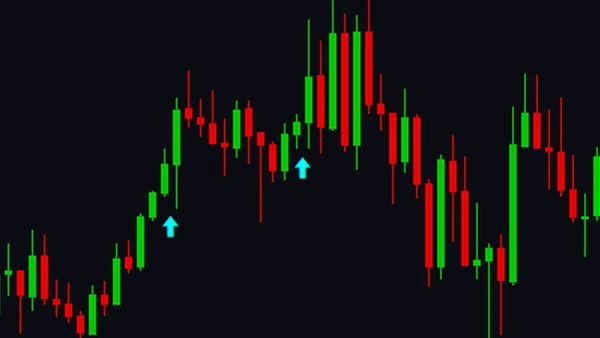
AI Breakout Pro
An ATR-adaptive breakout indicator with a real trained machine-learning model that scores each signal's confidence — set the AIThreshold and act only on the breakouts the engine ranks highest. Chart arrows plus a confirmation oscillator.
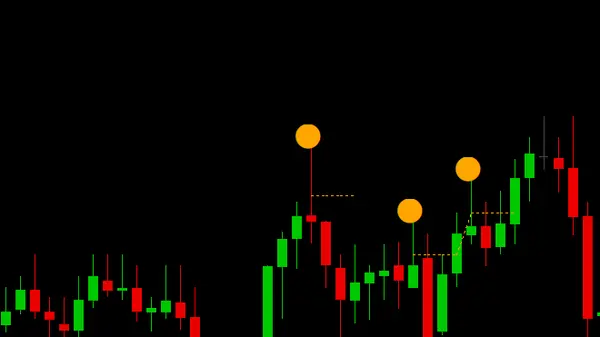
Pin Bar Reversal Points
A visual context tool that marks genuine long-tail rejection (pin) bars at swing extremes on any symbol and timeframe, auto-graded into three classes — no per-chart tuning.
From download to chart
Running it takes about a minute.
No web login, no subscription, no servers. It's a native MetaTrader 5 file you own.
Buy & download
Complete a one-time, secure checkout and download a single .ex5 file — no account to maintain.
Drop it in your terminal
Place the file in your terminal's MQL5/Indicators folder — the standard MetaTrader 5 install path.
Refresh the Navigator
Refresh the MetaTrader 5 Navigator panel and drag the indicator onto any chart, any timeframe.
Common questions
Before you load it.
The questions traders ask most about how these tools are built and run.
What does "bar-for-bar parity" actually mean?
Before any indicator is released, its MetaTrader 5 build is compared value-by-value against its independent reference across history. The markers must line up bar for bar. Matching the reference — not just compiling cleanly — is the standard for "done."
Which markets and timeframes do these work on?
Any symbol and any timeframe your MetaTrader 5 terminal can chart — forex, indices, metals, crypto, futures CFDs. The indicators read price action, not a specific instrument, so there is no per-symbol tuning required.
How do I install a StratusQuant indicator?
After purchase you download a single .ex5 file, drop it into your terminal's MQL5/Indicators folder, and refresh the Navigator panel. The indicator then appears in your list to drag onto any chart. It takes about a minute.
Are these signals to follow, or tools?
They are visual context tools that mark structure objectively on your chart — not trade signals to follow blindly and not financial advice. You decide what to do with what they show. Trading carries substantial risk of loss.
Every release, same standard
Two instruments live. Every one held to the same proof.
Pin Bar Reversal Points marks genuine rejection bars at swing extremes. AI Breakout Pro scores every breakout with a trained confidence model. Both engineered as original MT5 instruments and proven bar-for-bar against their reference before release — the standard every future StratusQuant indicator ships to.
Some links on this site are affiliate links. If you buy through one, StratusQuant may earn a commission at no extra cost to you.
The standard
Built like instruments, not marketed like miracles.
StratusQuant is a systematic-tools studio that ports its own proven price-action indicators to MetaTrader 5. Every tool is engineered to a written specification, proven value-by-value against an independent reference before release, and validated across multiple symbols and timeframes — no exceptions.
That discipline is the whole point: a tool either matches its reference and ships, or it doesn't ship. Mechanism-first, proof-backed, documented in plain English.
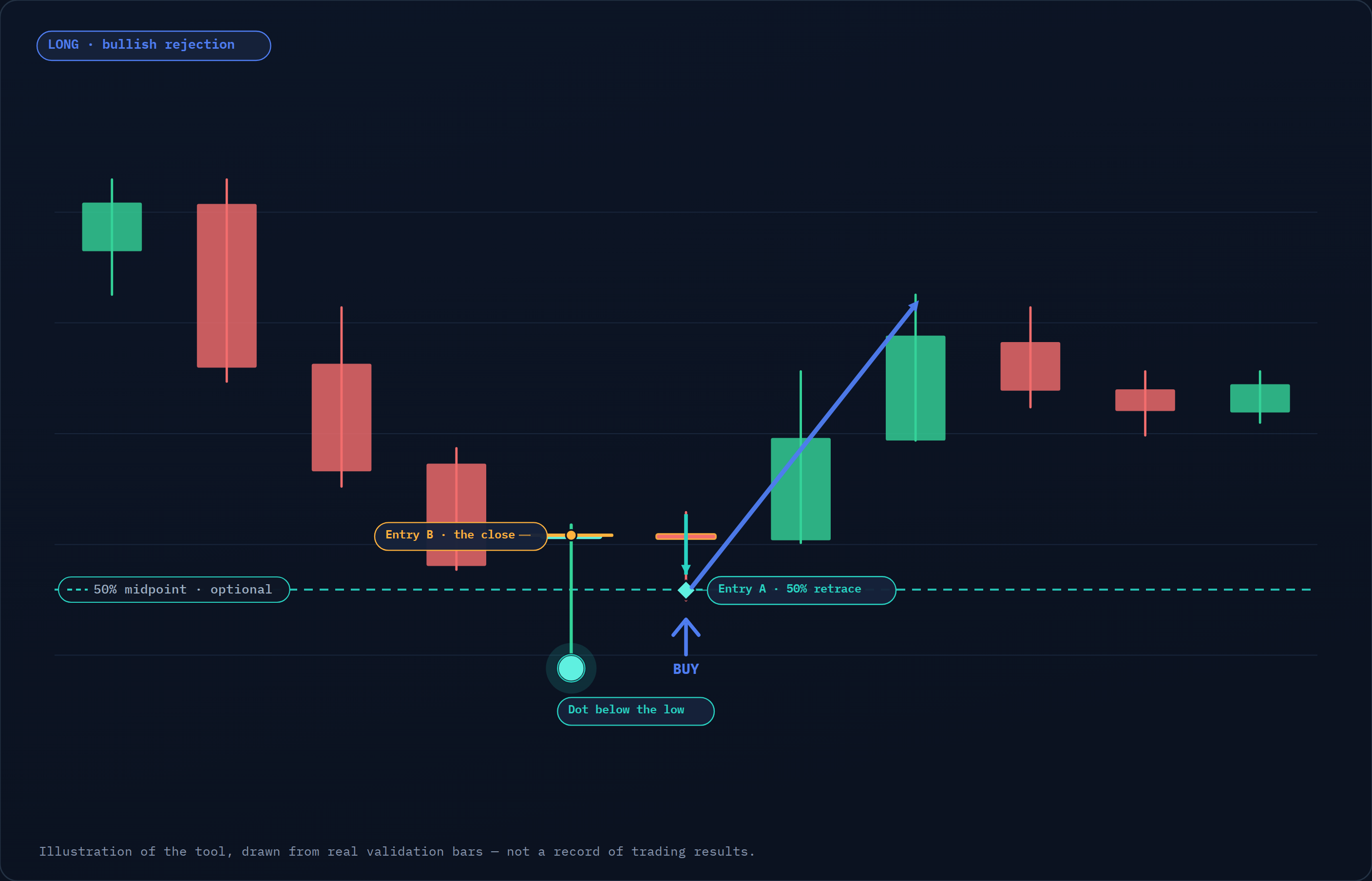
Consistent with the hypothetical-results standard of U.S. CFTC Regulation 17 C.F.R. § 4.41:
Hypothetical or simulated performance results have certain inherent limitations. Unlike an actual performance record, simulated results do not represent actual trading. Also, because the trades have not actually been executed, the results may have under- or over-compensated for the impact, if any, of certain market factors, such as lack of liquidity. Simulated trading programs in general are also subject to the fact that they are designed with the benefit of hindsight. No representation is being made that any account will or is likely to achieve profits or losses similar to those shown.